Unable to Connect to 5G Network
Unable to Connect to 5G Network
Possible Causes
- No 5G signal coverage in the area: Contact your carrier's customer service to confirm whether 5G network coverage is available in your location.
- Weak indoor 5G signal due to environmental factors: Complex building structures (e.g., thick walls) may block 5G signals.
- Router configuration issues: The router's 5G function may be disabled, or the frequency band settings may be inappropriate.
Solutions
- Confirm network coverage: Use a 5G-capable mobile phone to test for 5G signals in different nearby locations to determine if 5G coverage is available in your environment.
- Optimize router placement: Move the router closer to a window or near the exterior of the building to improve signal reception.
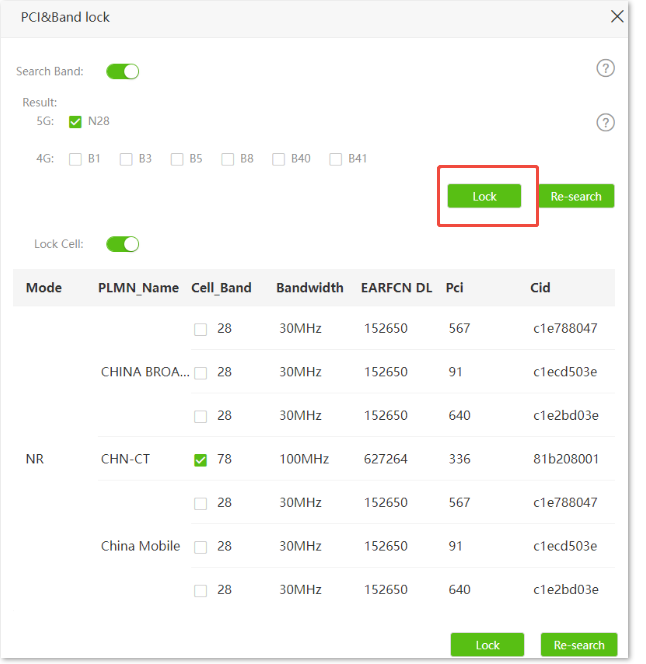
- Check router settings: Log in to the router's admin interface and ensure the 5G function is enabled. If the issue persists after enabling 5G, try locking to a different frequency band and save the settings to see if the 5G connection is restored.
Procedurefor configuring PCI&Band lock
- Log in to the web UI of the router.
- Navigate toAdvanced Settings> PCI&Band lock.
- Enable Search Bandand Lock Cell
- Select the 4G/5G frequency bandsor Cell_Bandto be locked as required.
- Click Lock.