4G301-How to login to the homepage of portable router
How to login to homepage of the portable 4G router?
Product line: 3G/4G Model number: 4G301
Part 2: Configure your computer
Part 3: Login to the homepage

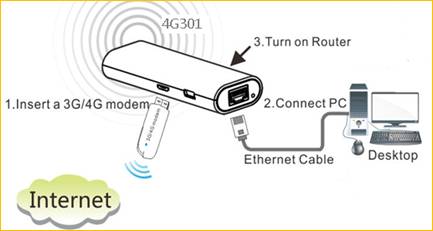
Connect the RJ-45 port of the router with an Ethernet cable. The topology is as below:

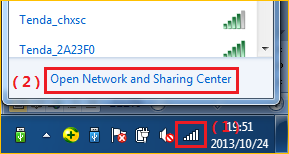
1 Click on Network Connection Icon on the system bar, then click on Open Network and Sharing Center. (Here is for windows 7, other operating system please click HERE.)
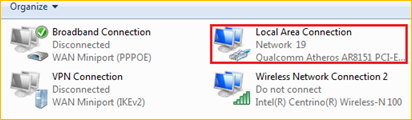
2 Click on Change adapter settings.

3 Right click on Local Area Connection, then choose Properties option.
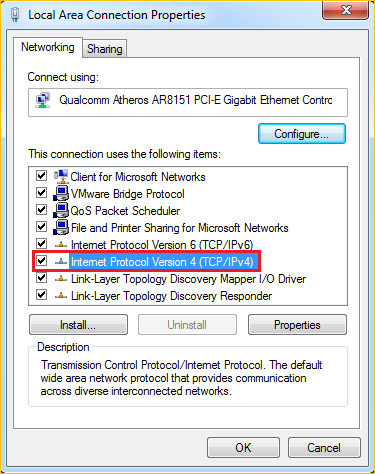
4 Double click on Internet Protocol Version 4(TCP/IPv4)
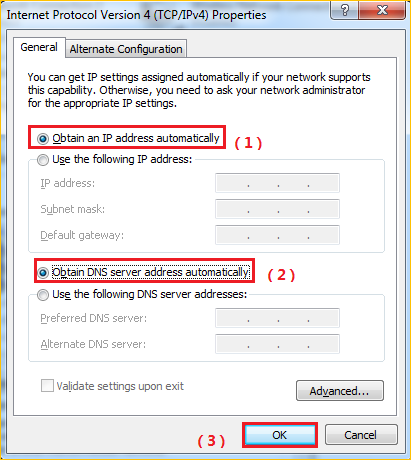
5 Choose Obtain an IP address automatically and Obtain DNS server address automatically and then click OK.
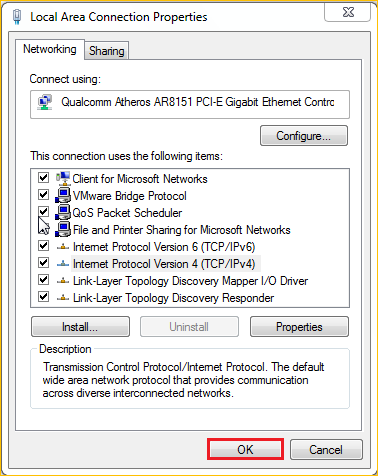
6 Also click on OK on the first Local Connection Properties window

1 Open a browser then type 192.168.2.1 in the Address bar, click Enter.

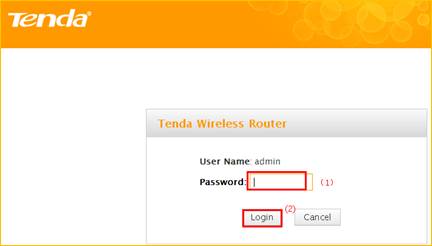
2 Type the Password as admin, and then click on Login button to login the setting page.
NOTE:
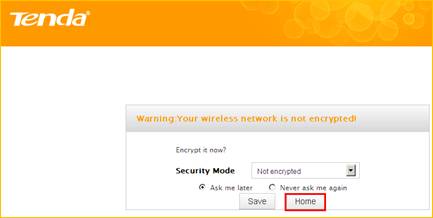
If you get this page, please click home directly to the main page.