


W15-Pro
Enjoy Your WiFi with Two-step Installation
AX3000 WiFi6
Dual-band Gigabit In-wall Access Point
Dual-band Gigabit In-wall Access Point

Wireless speed up to 3000Mbps, 160MHz channel bandwidth
Lightning fast speed, Beyond the ordinary
W15-Pro adopts the new generation WiFi6 technology, with160MHz channel bandwidth, dual-band concurrent wireless rate up to 3000Mbps. W15-Pro is designed to meet every network need in downloading, VR games, cloud gaming, etc. It can deliver simultaneous high-speed internet access to 80 devices.
W15-Pro 
Ordinary AP

 Speed
Speed Anti-interference
 Coverage
 Lag
Lag
Dual-band silver antenna for powerful signals
2x coverage performance of ordinary in-wall APs
Two omni-directional independent antennas with innovative design, equipped with a 4-way FEM signal amplifier. Compared with other ordinary APs, wireless signal transmission and reception capacity is increased by 2 times, which can easily cover 250㎡ villa/large suite. Unique antenna design effectively reduces co-channel interference and makes the WiFi signal more stable.


802.11k/v/r seamless roaming,
uninterrupted switching Strong WiFi on the go
With a unified SSID for the whole house, device automatically connects to the node with the best signal, latency is low to 50ms. Wherever you go, enjoy smooth and stable wireless speed.
 802.11k/v/r
 Lightning WiFi switching
Two-sided tap design,No tools needed
Enjoy Your WiFi with the easiest Installation
The W15-Pro can be installed with a double-sided tap on the back, plug in the cable and the AP will be attached to the original network port panel.
The location is flexible and it can be installed in a bedroom, study or balcony.
The location is flexible and it can be installed in a bedroom, study or balcony.
Standard 86 panel design to fit any house
Wireless coverage in four easy steps
Standard 86 type panel design with high scene adaptation. For installation, simply remove the original AP and replace it with W15-Pro, no rewiring is required and no damage is done to the original wall surface.
Step 1
Removing AP"s cover with a screwdriver
Step 2
Fixing the bracket to the network panel
Step 3
Plug in the ethernet cable
Step 4
Align the slot with the bracket and pull down the AP
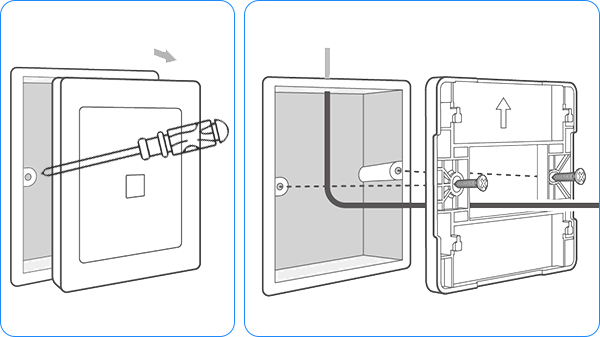
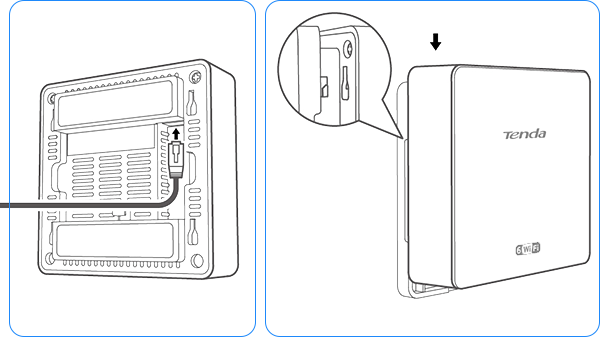
* Make sure the ethernet cable in the network panel is connected before installation

111 small louvres evenly spaced
30% better heat dissipation
and faster and more stable network speed
Unlike traditional in-wall AP designs, the shell of W15-Pro is higher than wall by 3 cm, increasing the contact area with air and speeding up heat dissipation without affecting the aesthetics of the space. At the same time, it is equipped with 111 cooling holes which increase the cooling efficiency by 30%.
Small louver vents
Heat
dissipation efficiency

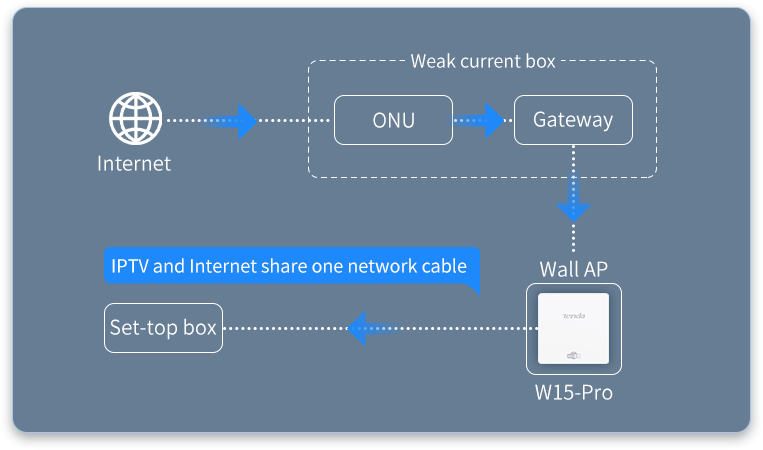
Separated IPTV and Internet ports
Enjoy both TV and Internet
W15-Pro provides a separated IPTV port, which is connected to STB box, avoiding the trouble of laying network cables.

*The data is obtained from Tenda Laboratory and may vary slightly in actual use depending on the conditions, environmental factors and individual product differences.
Please refer to the actual conditions of use. The final interpretation belongs to Tenda.
W15-Pro 功能特征及参数说明:
1、本页面的产品图片及内容仅作示意,实物产品效果(包括但不限于外观、颜色、尺寸)和显示内容(包括但不限于背景、UI、配图)可能略有差异,请以实物为准。
2、本页面中的数据为理论值,均来自腾达内部实验室,于特定测试环境下所得,实际使用中可能因产品个体差异、软件版本、使用条件和环境因素不同略有不同,请以实际使用的情况为准。
3、由于产品批次和生产供应因素实时变化,为尽可能提供准确的产品信息、规格参数、产品特性,本公司可能实时调整和修订以上页面中的文字表述、图片效果等内容,以求与实际产品性能、规格、指数、零部件等信息相匹配。
4、若有进行上述修改和调整的情形,恕不专门通知。