


Blazing Fast Wi-Fi 6
Enjoy Mesh Wi-Fi Everywhere
Enjoy Mesh Wi-Fi Everywhere
MX15 Pro
AX5400 Dual-Band Whole Home Wi-Fi 6 Mesh

Broadcom Tri-core
6 Signal Enhancement Module
Large Carring Capacity
Built in 6 Antennas
Devices
Bandwidth

 Tri-core 1.5GHz CPU
Powerful Brain | Faster Speed | Superb Performance
MX15 Pro uses a high-performance processing chip that supports the new-generation Wi-Fi 6 wireless protocol, with a dual-band concurrent rate of up to 5378Mbps. Compared with the AX3000 Mesh Wi-Fi system, the combined data transmission capability is 80% faster.
5378Mbps
The New Generation Wi-Fi 6
Others AX3000
80% Faster
DMIPS 10350
Broadcom Tri-core Chip
DMIPS 4600
Q*** Dual-core Chip
125% Faster

Intelligent Antennas
Designed for Signal Penetration
The intelligent array antennas after signal adjustment ensure that the signal cross-layer penetration is better than ordinary home routers.

4X4 160MHz Ultra-wide Bandwidth
2X Bandwidth | 2X Capacity | 2X Speed
MX15 Pro can support four concurrent spatial streams, which are twice as many AX3000 routers. Double Capacity, Double wireless speed.
*The data transmission speed between the router and terminal devices doubles when used with devices that support 160MHz bandwidth, such as mobile phones, computer network cards, etc.

6 Independent
High-power FEM modules(PA+LNA)
Powerful Penetration | Whole Home Wi-Fi Coverage
Each MX15 Pro has 6 external signal enhancement modules so that a 3-pack MX15 Pro can increase the Wi-Fi coverage to 4,200 sq. ft.

OFDMA+MU-MIMO, Less Lag
Multiple Access
OFDMA+MU-MIMO improves the efficiency of channel resources. Multiple user data can be transmitted in parallel simultaneously, solving the delay troubles of multiple people surfing the internet at the same time.

Online classes, conferences, and mobile games can perform simultaneously without lag.
Easy Setup in 3 Steps
Auto Connect | Simple Installation
MX15 Pro can automatically recognize the modem connection type to reduce setup steps. Installation can be done with just a few clicks. Built-in Pre-connection, You only need to set up one node, and the others will connect automatically.
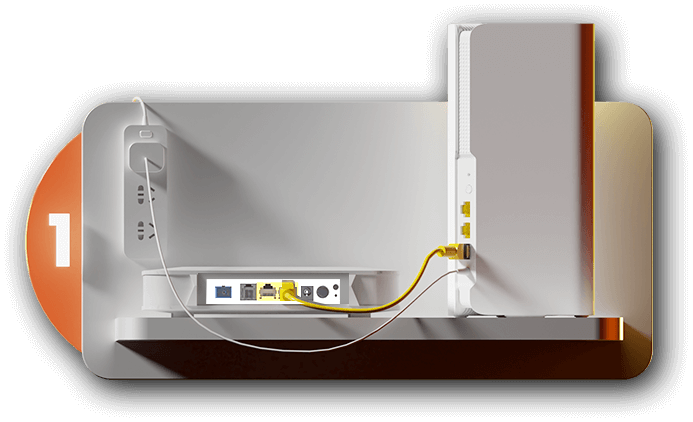
Select a router and insert the network cable connected to the wireless modem into the WAN port of the router.

Log in to the settings website, follow the lead to select the connection type and set up the Wi-Fi name and password.
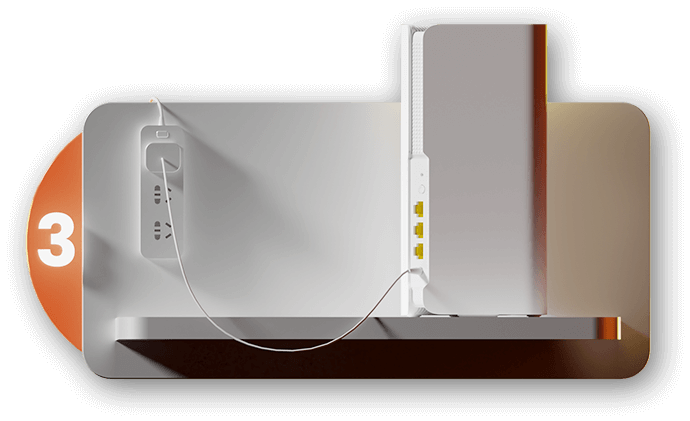
Plug the rest of the nodes into the power supply and wait to connect to the main node for networking. The installation is complete.

A Variety of Functions to
Meet Daily Management Needs
Speed Test | Monthly Report | Parental Control
One click Speed Test to easily know your network condition.Intelligently summarize network data and generate monthly reports, helping to know the connection condition of different devices.
Other Function

TWT

WPA3

IPv6

Intelligent Diagnosis

Guest Network
MX15 Pro 3-Pack 功能特征及参数说明:
1、本页面的产品图片及内容仅作示意,实物产品效果(包括但不限于外观、颜色、尺寸)和显示内容(包括但不限于背景、UI、配图)可能略有差异,请以实物为准。
2、本页面中的数据为理论值,均来自腾达内部实验室,于特定测试环境下所得,实际使用中可能因产品个体差异、软件版本、使用条件和环境因素不同略有不同,请以实际使用的情况为准。
3、由于产品批次和生产供应因素实时变化,为尽可能提供准确的产品信息、规格参数、产品特性,本公司可能实时调整和修订以上页面中的文字表述、图片效果等内容,以求与实际产品性能、规格、指数、零部件等信息相匹配。
4、若有进行上述修改和调整的情形,恕不专门通知。