


Dual-band Gigabit In-wall Access Point

Wireless speed up to 3000Mbps, 160MHz channel bandwidth
Lightning fast speed, Beyond the ordinary


 Speed
Speed Anti-interference
 Coverage
 Lag
Lag
Dual-band silver antenna for powerful signals
2x coverage performance of ordinary in-wall APs


802.11k/v/r seamless roaming,
uninterrupted switching Strong WiFi on the go
 802.11k/v/r
 Lightning WiFi switching
Two-sided tap design,No tools needed
Enjoy Your WiFi with the easiest Installation
The location is flexible and it can be installed in a bedroom, study or balcony.
Standard 86 panel design to fit any house
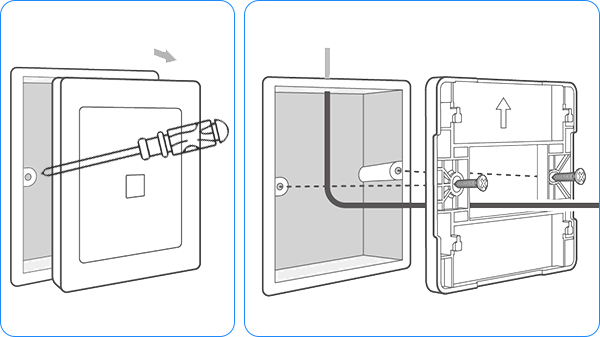
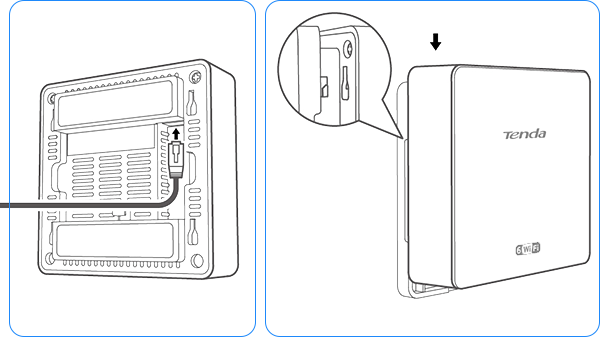
Wireless coverage in four easy steps
Step 1
Removing AP"s cover with a screwdriver
Step 2
Fixing the bracket to the network panel
Step 3
Plug in the ethernet cable
Step 4
Align the slot with the bracket and pull down the AP

111 small louvres evenly spaced
30% better heat dissipation
and faster and more stable network speed
Small louver vents
Heat
dissipation efficiency

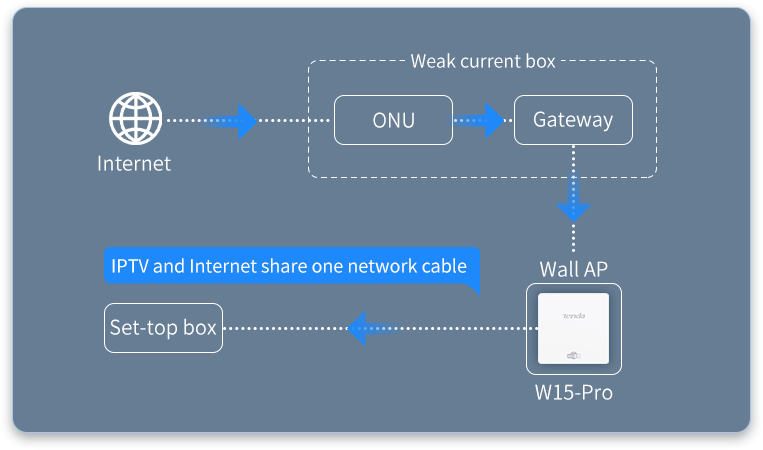
Separated IPTV and Internet ports
Enjoy both TV and Internet

*The data is obtained from Tenda Laboratory and may vary slightly in actual use depending on the conditions, environmental factors and individual product differences.
Please refer to the actual conditions of use. The final interpretation belongs to Tenda.
W15-Pro Detalles y especificaciones:
1、Las imágenes y el contenido de esta página son solo de referencia. La apariencia real del producto (incluiyendo, entre otros, diseño, color y tamaño) y el contenido mostrado (incluyendo, entre otros, fondo, interfaz e imágenes) pueden variar ligeramente. Consulta el producto físico.
2、Los datos de esta página son valores teóricos obtenidos en el laboratorio interno de Tenda bajo condiciones de prueba específicas. El rendimiento real puede variar debido a variaciones entre productos, versiones de software, condiciones de uso y factores ambientales. Consulta el uso real.
3、Debido a cambios en tiempo real en los lotes de productos y factores de suministro, podemos actualizar y revisar en tiempo real los textos descriptivos, efectos de imagen, etc. de esta página para que coincidan con el rendimiento real del producto, las especificaciones, los índices y los componentes. Cualquier modificación o ajuste de este tipo no se notificará por separado.
4、Si se produce cualquier modificación o ajuste, nos reservamos el derecho de realizarlo sin previo aviso.