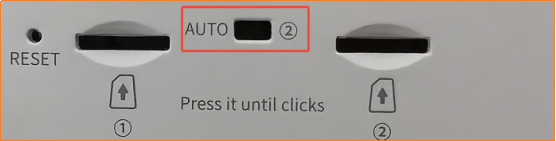
Tenda 5G06 supports dual SIM cards. When you want to switch the network card, please use the physical dip switch at the bottom of the device.
2. How to confirm if the switch is successful?
-
Check the indicator light on the front of the device: There will be an indicator light (usually in the shape of signal bars) representing the cellular network connection that stays steadily lit.
-
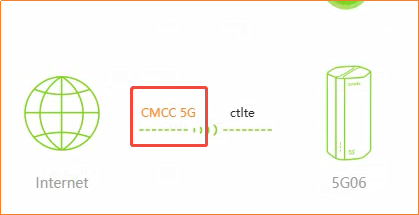
Log in to the web management interface: The name of the carrier displayed on the homepage (e.g., "CMCC 5G" or "CitTel") in orange indicates the SIM card currently in use. (As shown in the figure below)

This is where the 5G06's intelligence lies. The device is equipped with an automatic failover function.
When the hardware switch is set to the "AUTO" position, but SIM1 fails to connect to the internet (e.g., no signal, SIM card failure, etc.), the system software will automatically (AUTO) switch the network connection to SIM2 to ensure your internet connection remains uninterrupted.
If your primary card (SIM1) is from China Mobile and your backup card (SIM2) is from China Unicom, when the device detects that the China Mobile network is unavailable, it will automatically activate the China Unicom network even if the switch is set to SIM1.
Hardware switch sets the primary card -> The software AUTO function is responsible for activating the backup card when the primary card fails.